Handbook
Learn 101 — Admin dashboard and Studio
Outcome: you know what /admin/ shows, how Studio binds Fleet, and where screenshots come from.
Audience: operators and Lenses users. Time: ~15 minutes plus optional Playwright run. Verify: you can open /admin/ on your Fleet base URL and correlate a job row with GET /v1/jobs/{id}.
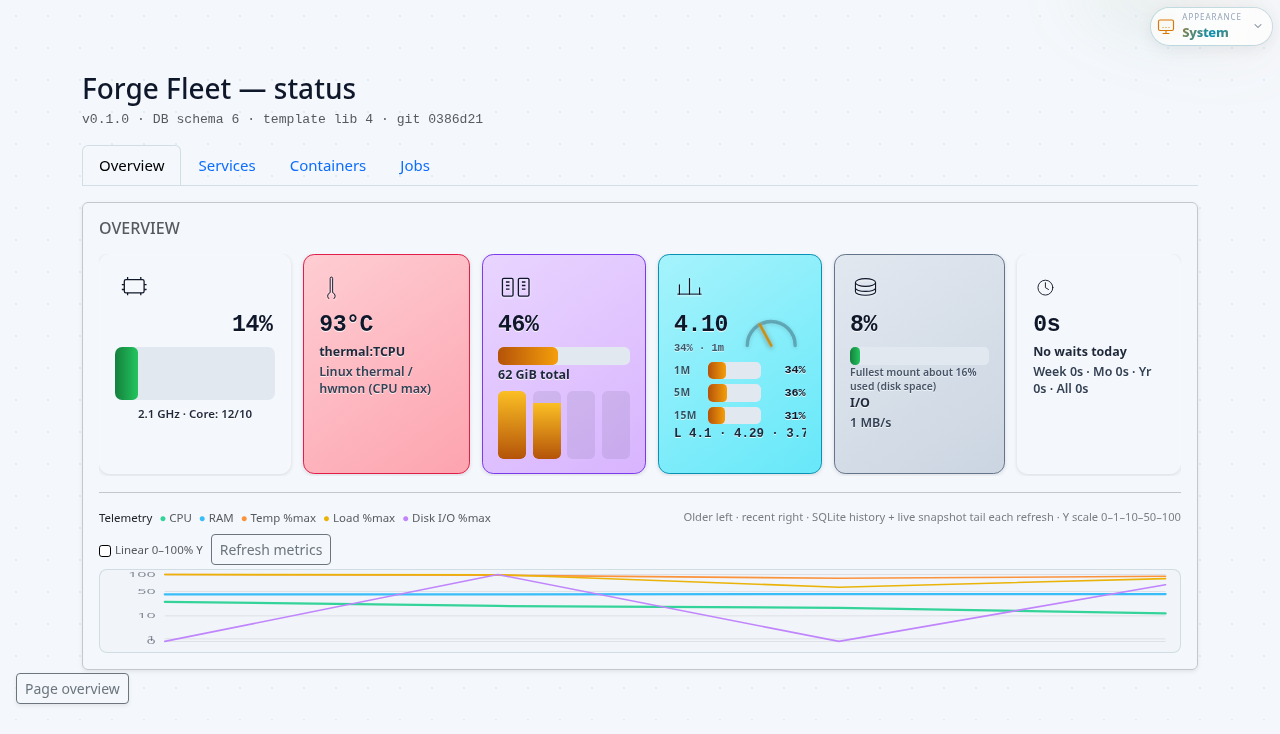
/admin/ is the operator console for this Fleet host: host metrics, jobs, container swimlanes, Fleet Apps, capacity guardians, and cooperative upgrade actions. It polls GET /v1/admin/snapshot and related admin APIs (never runs root shell commands from the browser).
Main tabs
| Tab | What you see |
|---|---|
| Overview | Release identity, jobs-by-status chart, host processes, active workers, recent jobs table |
| Services | Managed compose services (forge_llm, Market Studio gateways, …) with start/stop where applicable |
| Containers | Container-type swimlanes from GET /v1/container-types |
| Jobs | Deeper job list and filters |
| Apps | Installed FAEP apps and catalog install actions |
| Capacity | Space Guardian (disk tiers, orphan volumes) and Memory Guardian (RAM pressure, idle parking, policy) |
Use Settings… in the scope bar (offcanvas) for connection, machine role, edge checklist, mesh capacity, and generated command recipes.
Settings offcanvas
- Connection — peer id, URL, bearer; Save connection (API only); probe and view remote dashboard.
- Machine — laptop vs public server; edge hostname and Caddy port when publishing.
- Edge (public server only) — Cloudflare tunnel + unified Caddy checklist; Verify public health via
POST /v1/operator/verify-public-health. - Capacity — mesh headroom table (
GET /v1/mesh/capacity) for CPU, RAM, and GPU/VRAM planning estimates. - Commands — generated recipes tagged web UI / user / root; copy shell blocks only when needed.
Manage peers… opens the advanced peer editor (same PUT /v1/remote-peers/* API). When editing, leave bearer empty to keep the stored token.
Full operator path: Connect to remote Fleet.
Cooperative upgrade
Update Fleet on /admin/ queues POST /v1/admin/upgrade (apt signal or cooperative git dev path by install channel). POST /v1/admin/git-self-update is deprecated (returns 400). Production hosts should use the apt channel — see Upgrade & remote operations and Migrate to apt.
Forge Lenses (Studio): Settings → Fleet binds LENSES_FLEET_URL + LENSES_FLEET_TOKEN. Docs Health runs configurable session_step jobs via Fleet’s Docker host; Test Fleet calls POST /v1/admin/test-fleet from the workspace server (never directly from arbitrary browser origins).
Forge LCDL (governed LLM tasks/operators) stays a separate concern—Fleet runs containers; forge-lcdl orchestrates deterministic LLM work. See Forge LCDL ↔ Fleet.
Forge LLM helpers
See Operate 301 — Troubleshooting for operator-visible failure modes (502 via Caddy, template build regressions, etc.).
Screenshots workflow
/admin/ marketing-quality PNGs regenerate through Playwright (details in [docs/assets/README.md](../assets/README.md)).
cd forge-fleet
npm ci
npx playwright test e2e/docs-screenshots.spec.ts
The harness targets 127.0.0.1:19876 by default—not the usual 18765 / 18766** loop.
Phrases automation uses
These collide with Cursor workspace conventions—prefer explicit wording in CI notes:
| Phrase | Usually means |
|---|---|
| “Update fleet” | ./scripts/update-fleet.sh (semver bump → push → install paths). With --remote-upgrade --publish-apt-cdn, remote hosts upgrade via POST /v1/admin/upgrade. |
| “Update service” | Local ~/forge-fleet pull plus ./update-user.sh / systemctl --user restart forge-fleet.service—not the semver release script unless the operator asked for that. |
| “Update certificator” | Certificator refresh plus remote POST /v1/admin/upgrade—see workspace Forge rules ordering. |
Do not store bearer tokens inside Markdown copies—prefer env files (forge-fleet.env, systemd drops) referenced from README.md and systemd/environment.example.
Related
| Topic | Doc |
|---|---|
| Caddy/TLS façade | Caddy systemd · Unified Granite |
| Admin tile design | Maintainers · Admin KPI design |
| Release operations | Upgrade & remote self-update |
| Capacity guardians | Space Guardian · Memory Guardian |